Search Box:   
Showing posts with label orkut. Show all posts

Open multiple gmail and orkut accounts in Firefox

| Monday, January 19, 2009 |


Many of you might be having multiple orkut accounts or gmail accounts and must be having difficulty in accessing them simultaneously in Mozilla Firefox.Here is the solution to this problem which has been tested in Vista and also in XP. Follow the following steps and you will be able to login in gmail and orkut with multiple accounts. Through this you will be able to make profiles in your firefox.

Step 1:Open system properties(by right clicking my computer), choose tab advanced, click to environment variables button. in system variables section, click new. type this information to each textbox.

Step 2
:variable name: moz_no_remote (should be all small letter).variable value: 1


Step 3
:open firefox icon's properties(from desktop and quick launch). add extension -p to command line(like "c:\program files\mozilla firefox\firefox.exe" -p). press ok.


When you will open firefox it will prompt for profile selection create a profile,open firefox login to orkut open once more use another profile login.

[Thanks Aditya]


Read more...


Orkut blocked with proxy?

| Monday, September 22, 2008 |


Hey is Orkut blocked in your college? Are you using a proxy? Are you still facing some problem? Is orkut still blocked?
Don't worry. I am not in a mood to take a viva. I was just asking all this stuff because I do face this problem. After a lot of search work I was able to find the solution to the problem of blocked orkut in the proxy also.So I thought Why not share the same with you.
Here is the solution to this problem.Just check out the address bar. You will find a main# there.Just remove it and now you can access your orkut account on the proxy. So take a chill pill !!


Read more...


Send Secret Messages in Orkut

| Tuesday, August 26, 2008 |

You must be using Orkut.Don't you?

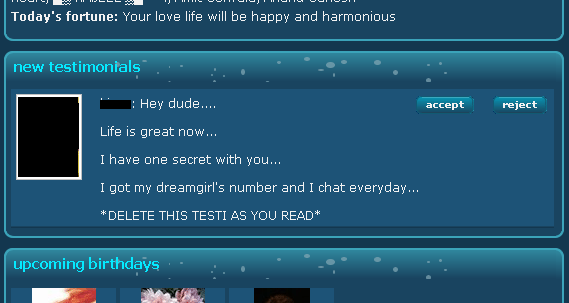
Well everybody is a fan of orkut.But there is one problem that we often face in orkut.The problem is that if we want to send a secret information in orkut then we cannot send it privately.The secret information can be anything like a phone number,address,email id etc.It becomes public or visible to other friends .Now there is a solution to this problem I found courtesy Pavan.

Secret message as orkut testimonial

Hope you all know the orkut testimonials. This is the solution discussed here. Whenever you send a testimonial, it will be popped up in the orkut home just below the recent visitors section. That definitely grabs the attention of user and he will surely notice that! In the testimonial content, don’t forget to write the message that he should not accept the testimonial and MUST reject that. Have you ever tried this before?


Read more...


Olympics 2008 Theme in Orkut

| Thursday, August 14, 2008 |


Orkut has recently unveiled the Official Olympics 2008 Theme for only Brazilian Users. Since the theme is only for Brazilian users, orkut members who reside in countries other than Brazil cannot enjoy this theme. No worries, OrkutPlus! has a workaround for you…

Olympic 2008 - Orkut Theme


Read more...


Check Yahoo! Mail and Gmail on Orkut

| Wednesday, August 13, 2008 |

An orkuteer has come up with very cool applications for orkut users who are adicted to orkut.These application allows the users to check and operate their gmail and yahoo accounts through orkut.


Orkut Application Review - Gmail

This application is not yet visible in orkut application directory. You can still access this application if you have an orkut sandbox account. Those having orkut sandbox account can have a feel of this application - Gmail in Orkut.

Considering the utility of this application, you can very soon see this app listed in orkut application directory.

Orkut Application Review - Yahoo! Mail

Yahoo Email application allows yahoo orkut users to check their emails on orkut itself. The application is pretty quick to load since it uses the mobile version of yahoo mail which cuts down heavy loading. All in all, cool for those who are addicted to orkut at the same time get butterflies now and then checking their email inbox.

Installation and Usage

  • Install Yahoo! Mail Orkut Application
  • Just navigate to the application page and login to check your emails.


Read more...


Orkut is banned - virus solution

| Saturday, August 9, 2008 |

Finally!!I had to suffer this problem as well because of which I had to format my harddisk but now you dont have to face any trouble becausehere is the solution to one of the bigger problems of today - orkut is banned error.
Tosday orkut is one of the most well known social networking website.So when such a bug haunts you you get into a deep trouble and get cutoff with your online friends.
But with the solution you need not worry.
This happens because of “Heap41a / win32.USBworm” virus.


This virus can easily spread through removable storage devices especially USB drive. To fix this trouble follow the instruction
1. Open the task manager by pressing Ctrl + Alt + Del
2. Go to “Processes” tab….

3. Look for services name with “svchost.exe”. There will be many namesakes. You have
to look at the name with log in user name.
4. If you find that just delete it or give end process button. It will confirm the process
accept it.
5. Now go to “regedit” from run and navigate the following keys.
HKEY_LOCAL_MACHINE\SOFTWARE\Microsoft\Windows\Current Version\Run
HKEY_LOCAL_MACHINE\SOFTWARE\Microsoft\Windows\Current
Version\Policies\Explorer\Run
6. Look for a key in right side pane with the name “Winlogon”. This will have
“heap41a\svchost.exe” in its value field and delete the file.
7. Now navigate the following key.
HKEY_LOCAL_MACHINE\SOFTWARE\Microsoft\Windows\Current
Version\explorer\Advanced\Folder\Hidden\SHOWALL
And in right-side pane, change value of “CheckedValue” to 1
8. Now enable “Show Hidden Files/Folders” option in “Tools -> Folder Options” in
My Computer.
9. Right-click on Start button and select “Open“. Now open “Programs” folder, here you’ll see a folder “Startup“. Open it and if you get a hidden file there, delete it. If its not there, then close it.
10. At last open “My Computer” and open C: drive. Disable “Hide Protected System files” option in “Tools -> Folder Options“.
11. Check the folder “heap41a” in C: drive. Delete it.
12. Reboot the system then your problem will be fixed.


Read more...